Procure & fulfil

AI order entry: every order turned into a finished sales order in your ERP.

PDF, Excel, email or photo, even handwriting: Scalera reads the order, matches each line to your product catalogue and sends it to your ERP. Your back office only checks where the AI is unsure, instead of retyping every line.

Logo ERNE

Trusted by 150+ leading industry companies

«Mit Scalera haben wir unsere administrativen Abläufe stark verschlankt. Heute reicht eine zentrale Stelle, um die Kalkulatoren optimal zu unterstützen und gleichzeitig deutlich mehr Volumen zu bewältigen.»

Ciril Disch

Leiter Hochbau, Mitglied der Geschäftsleitung, HEW

Weniger Abtippen, schnellere Auftragsbestätigungen

Formate
PDFExcelMailtextFotoScanHandschrift

Jedes Format, auch Handschrift.

PDF, Excel, Mailtext, Fotos und schlechte Scans.

Pos. 1 Rinnenelement Typ 100
96 %
Pos. 2 Abdeckrost Guss
91 %
Pos. 3 Stirnwand
prüfen

Jede Position zugeordnet.

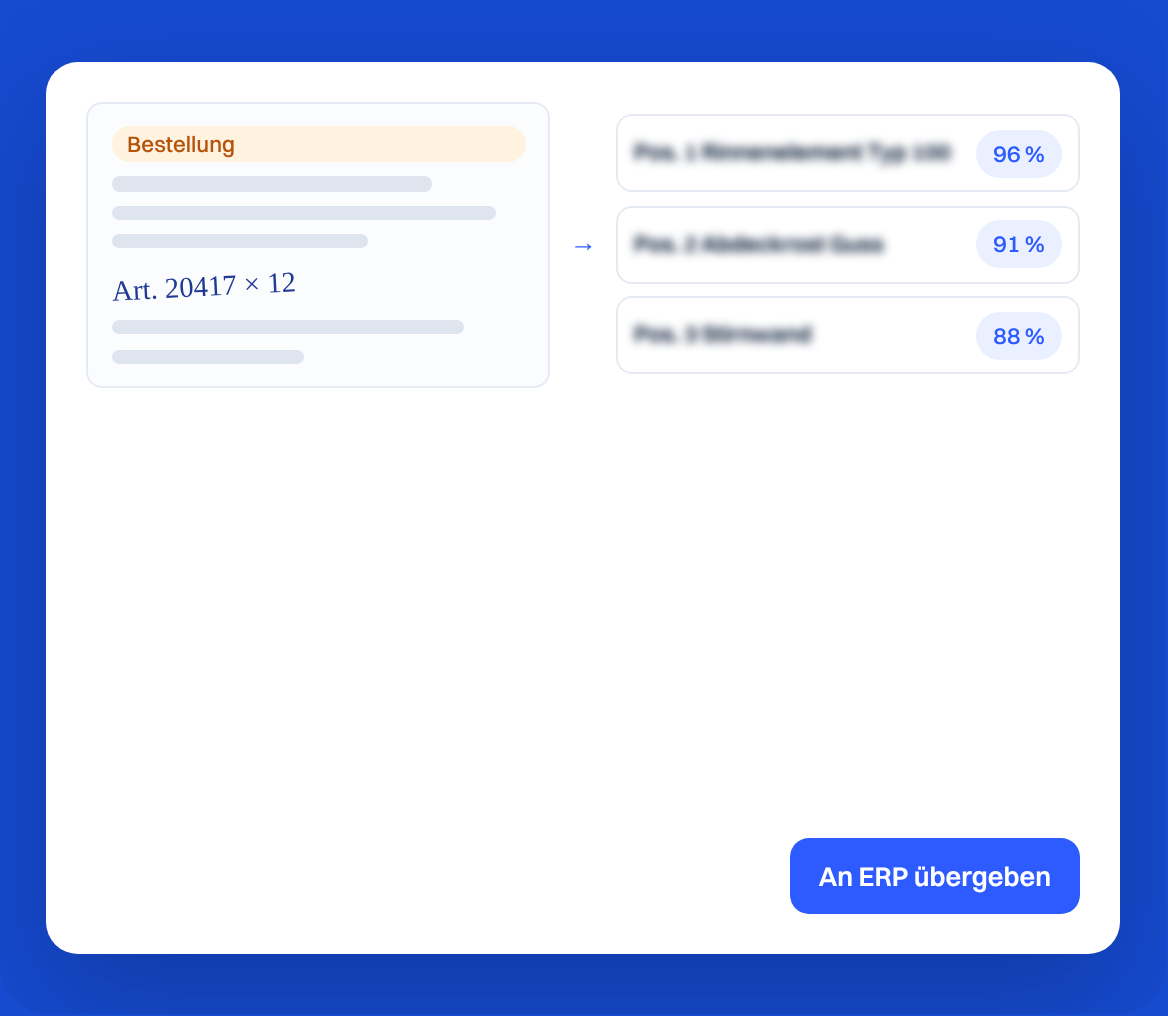
Scalera gleicht jede Zeile mit deinem Katalog ab und zeigt pro Treffer einen Konfidenzwert.

Auftrag
Lieferdatum
Ansprechperson
Lieferadresse
Rechnungsadresse

Vollständige Aufträge.

Lieferdatum, Ansprechperson sowie Liefer- und Rechnungsadresse sind gleich mit erfasst.

Vom Posteingang ins ERP

E-MailUpload
↓
Scalera
↓
Positionen
1

Einlesen.

Bestellungen kommen per E-Mail oder Upload. Scalera erkennt die Positionen, auch handschriftlich ergänzte.

Pos. 1 Rinnenelement Typ 100
96 %
Pos. 2 Abdeckrost Guss
91 %
Pos. 3 Stirnwand
prüfen
2

Zuordnen.

Jede Position wird einem Artikel aus deinem Katalog zugeordnet. Unsichere Treffer sind markiert.

Auftrag
↓
Scalera
↓
SAP S/4HANAMicrosoft Dynamics 365AbacusProalpha
3

Übergeben.

Der geprüfte Auftrag geht an dein ERP oder CRM, zum Beispiel SAP S/4HANA, Microsoft Dynamics 365, Abacus oder Proalpha.

Häufige Fragen

Liest Scalera auch handschriftliche Bestellungen?

Ja. Die Handschrifterkennung erfasst Positionen auch aus handschriftlich ergänzten Bestellungen und schlechten Scans, zum Beispiel aus Fotos von Ausdrucken.

Was passiert, wenn ein Artikel nicht eindeutig ist?

Scalera markiert den Treffer mit niedriger Konfidenz. Dein Team entscheidet, bevor der Auftrag ins ERP geht.

Wie kommen die Aufträge ins ERP?

Über eine der Integrationen, zum Beispiel SAP, Microsoft Dynamics, Abacus oder Proalpha, oder als Export. Die ganze Liste steht auf der Seite ERP-Integrationen.

“With Scalera, we have significantly streamlined our administrative functions. Today, a central location is enough to optimally support the calculators and at the same time handle significantly more volumes.”

Ciril Disch

Head of Building Construction, Member of Management, HEW

Less retyping, faster order confirmations

Formats
PDFExcelEmail textPhotoScanHandwriting

Every format, handwriting too.

PDF, Excel, email text, photos and poor scans.

Pos. 1 Rinnenelement Typ 100
96 %
Pos. 2 Abdeckrost Guss
91 %
Pos. 3 Stirnwand
check

Every line matched.

Scalera checks each line against your catalogue and shows a confidence score for every match.

Sales order
Delivery date
Contact person
Delivery address
Billing address

Complete orders.

Delivery date, contact person, delivery and billing address are captured too.

From inbox to ERP

EmailUpload
↓
Scalera
↓
Line items
1

Read.

Orders arrive by email or upload. Scalera recognises every line, including handwritten additions.

Pos. 1 Rinnenelement Typ 100
96 %
Pos. 2 Abdeckrost Guss
91 %
Pos. 3 Stirnwand
check
2

Match.

Each line is matched to an article in your catalogue. Uncertain matches are flagged.

Sales order
↓
Scalera
↓
SAP S/4HANAMicrosoft Dynamics 365AbacusProalpha
3

Hand over.

The checked order goes to your ERP or CRM, for example SAP S/4HANA, Microsoft Dynamics 365, Abacus or Proalpha.

FAQ

Can Scalera read handwritten orders?

Yes. Handwriting recognition captures lines even from handwritten additions and poor scans, for example photos of printouts.

What if an article is not clear?

Scalera flags the match with a low confidence score. Your team decides before the order goes to the ERP.

How do orders get into the ERP?

Through one of the integrations, for example SAP, Microsoft Dynamics, Abacus or Proalpha, or as an export. The ERP integrations page has the full list.

What our customers say

ACO reference image

"Scalera has made us feel that we and our ideas are important."

‍

Marco Dürst, ACO
Marco Dürst

Management

“Scalera has made our supplier communication significantly simpler and more efficient. The tool is easy to use, saves valuable time, and makes our day-to-day work noticeably easier.”

Pius Zurfluh, GAMMA AG Bau
Pius Zurfluh

Managing Director

Dormakaba reference image

We are systematically continuing to build our organization towards data-driven processes.”

Pascal Kägi, Dormakaba
Pascal Kägi

Member of the Executive Board

Frauenthal reference image

“In the past, it took us 30 to 40 minutes for a large tender. Today we are around 10 to 15 minutes with Scalera. That makes a huge difference in our volume.”

Markus Grafl

Head of Central Offer Management

Lazzarini reference image

“Scalera is our new employee in processing offers — thinks quickly, never complains, doesn't take breaks and knows every position by heart!”

Marc Caminada, Lazzarini
Marc Caminada

Construction guide

“The greatest benefit for us has truly been the time saved. We are effectively saving money.”

Michael Lang

Managing Director

Send us a real order

No contracts. No long-term commitment.

Used by 150+ manufacturers, dealers and general contractors across Europe.